View Snapchat Stories & Highlights Anonymously
Anonymously view Snapchat profiles, Stories, and Highlights, while analyzing followers, bio, and location. Check video statistics and easily download Full HD photos and videos.
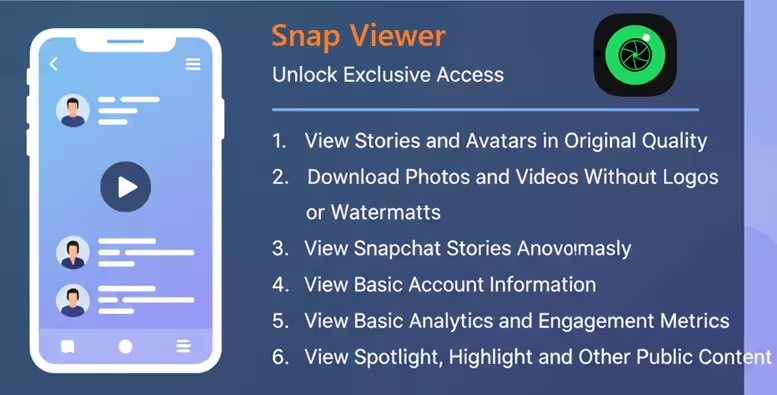
Have you ever wanted to view someone's Snapchat Story, Spotlight, or Highlight without logging in or leaving any trace? SnapViewer on Snap-viewer.com gives you a simple way to browse public Snapchat content privately, quickly, and at no cost. You can use it on almost any device without creating an account or installing extra software. The platform offers a clean interface, high-quality viewing, and easy downloads for public content. This guide explains how SnapViewer works, its main benefits, helpful tips, and everything you need to know before using it.
How to Use Snapchat Story Viewer Anonymously!
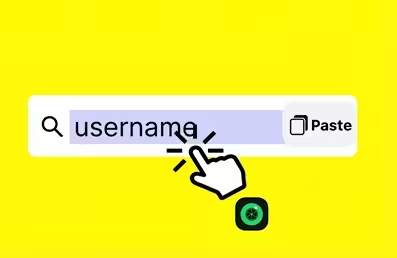
Step 1: Visit the SnapViewer website.
Open your web browser and go to https://snap-viewer.com
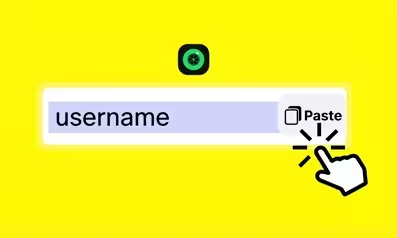
Step 2: Enter a username or paste a profile link.
Type the Snapchat username, with or without the @ symbol, or paste the Snapchat profile URL into the search box. Check the spelling carefully to get the most accurate result.

Step 3: Click Search and start viewing.
The tool loads available public Stories and profile information, if available. You can watch the content directly, view it again as many times as you like, or download high-quality photos and videos with the download button.
Why Use Snap Story Viewer?
1. No need to log in to a Snapchat account.
2. View Stories, Spotlights, and Highlights anonymously.
3. Download high-quality photos and videos.
4. Use it on phones, tablets, and computers.
5. Enjoy fast searches and a simple, user-friendly interface.
6. Access the tool for free without installing an app.
7. View public profile information when available.
8. Protect your privacy while using the service.
Tips for Using a Snapchat Profile and Story Viewer Effectively!
1. Always check the username before you search. Even one incorrect character can prevent you from finding the right profile.
2. Enter the username with or without the @ symbol. For example, both @snapviewer and snapviewer work.
3. Use Incognito or Private Mode in your browser if you want an extra layer of privacy while browsing.
4. Click the Download button to save Story photos or videos to your device quickly.
5. If you run into an error, close your browser completely and open it again. You can also try a different browser.
6. Error messages may appear if you enter the wrong username, the account is locked, the profile is private, or no public Story is currently available.
7. Save the website as a bookmark so you can open it faster the next time you need it.
8. Use Chrome, Safari, or Firefox for the most stable experience.
9. Turn off ad blockers and unnecessary browser extensions for a while if you notice display issues or unexpected errors.
Top 11 Features of Snap Viewer: Watch High-Quality Snapchat Stories
1. View Stories and Avatars in Original Quality
SnapViewer lets you view Snapchat Stories, videos, images, and profile avatars in their original quality. The tool keeps the original resolution, so every photo and video looks clear and sharp. You can enjoy more natural colors and see every detail more easily.
2. Preview Story Thumbnails
You can preview Story thumbnails before opening the full content. This feature helps you save time and quickly find the Story you want to view. It also makes browsing public content faster and more convenient.
3. Show When a Story Was Posted
SnapViewer shows the publishing time for each available Story. You can easily tell if a Story is recent or older before opening it. This feature helps you follow the latest updates from public Snapchat accounts.
4. Download Photos and Videos Without Logos or Watermarks
You can save Story photos and videos directly to your device without logos or watermarks. Downloaded files keep their original quality for a better viewing experience. You can store them for personal use or watch them again whenever you need.
5. View Snapchat Stories Anonymously
SnapViewer lets you watch public Snapchat Stories without revealing your identity. The account owner will not know that you viewed the content. You can browse public Stories privately and enjoy a more comfortable viewing experience.
6. View Basic Account Information
If a Snapchat account shares public information, you can view basic details such as the bio, follower count, and location. This feature gives you a better understanding of the profile you are viewing.
7. View Basic Analytics and Engagement Metrics
SnapViewer can display basic public metrics, including engagement levels, content performance, and other available analytics. These insights help you understand how a public account performs. This feature works well for content creators, marketers, or anyone who wants to evaluate an account's popularity.
8. Support Multiple Languages
SnapViewer supports multiple languages to serve users around the world. You can use the tool in a language you know best, making navigation easier and more comfortable. Available languages include English, Thai, French, Italian, Portuguese, Spanish, Vietnamese, Indonesian, and more.
9. View Spotlight, Highlight, and Other Public Content
SnapViewer lets you view more than Snapchat Stories. You can also browse Spotlight, Highlight, and other public Snapchat content from one place. This feature gives you access to a wider variety of public posts without switching between different tools.
10. Enjoy Unlimited Daily Use
You can use SnapViewer as many times as you want each day. The tool does not limit your daily searches or views. This flexibility makes it suitable for both occasional browsing and regular content tracking.
11. Support Multiple Content Formats
SnapViewer supports various types of Snapchat content, including photos, videos, slideshows, and other common Story formats. You can view and save different types of public content with ease. This feature creates a more convenient and complete viewing experience.
Who Should Use an Anonymous Snapchat Viewer?
1. Journalists and content researchers: Follow trends and collect public information without exposing your identity.
2. Content creators: Explore ideas, content styles, and creative inspiration from other creators in private.
3. Everyday users: View public Snapchat profiles and Stories without worrying about being noticed.
4. Parents: Keep track of your child's public interests and social media activity through publicly available content.
5. People who want to view a friend's or crush's Story: Watch public Stories without leaving a viewing record.
6. Sales professionals and marketers: Research competitors, monitor campaigns, or review content from potential customers through public Snapchat profiles.
How Safe and Legal Is Snap Viewer?
1. No Snapchat login required.
2. No app installation required.
3. Uses secure HTTPS/SSL connections.
4. Does not store your search history.
5. Does not ask for your password or other sensitive information.
6. Shows only public content or content that you can access legally.
7. Provides a clear privacy policy.
9. Includes a content removal and DMCA request process when needed
9. You must follow copyright laws and privacy regulations in your country or region.
10. Does not contain malware or viruses.
Snap Viewer vs. Other Snapchat Viewer Tools !
| Tool | Pros: | Cons: |
|---|---|---|
| Snap Viewer | Easy to use, no login required, supports Snapchat Stories, no intrusive ads, fast performance | Depends on publicly available content |
| Snaplytics | Includes analytics features, suitable for marketing research | Displays ads, slow speed |
| StoryClone | Simple and user-friendly interface | Fewer advanced features, includes ads |
| SnapNinja | Supports multiple content formats | Displays ads, frequent errors |
Frequently Asked Questions for Snapchat!
What Is a Snapchat Viewer?
A Snapchat Viewer is an online tool that helps you search for and view public Snapchat content, including Stories, Spotlights, Highlights, profile photos, and public profile information. You only need to enter a Snapchat username or profile link to start searching. The tool works directly in your browser, so you do not need to log in to Snapchat or install an app. You can now use this Snapchat Viewer at snap-viewer.com.
Can I Like or Comment on a Snapchat Story?
No. Snap Viewer only lets you view and download available public content. You cannot like, comment on, or send messages through the tool.
Can I View Private Snapchat Accounts?
No. SnapViewer only supports public Snapchat accounts and publicly available content. You cannot access private accounts or content available only to approved followers.
Can I View Snapchat Reposts?
No. SnapViewer does not support viewing Snapchat reposts at this time.
Why Are Some Posts Not Available?
A post may not appear for several reasons. The Story may have expired after 24 hours, the account owner may have deleted it, the account may be private, the username may be incorrect, or the content may have regional or age restrictions.
How Can I View Old Snapchat Stories?
You cannot view regular Snapchat Stories after they expire. Standard Stories usually disappear 24 hours after the account owner posts them.
Can I See Story Likes or Comments?
No. Only the person who posted the Story can view its likes and comments. Snap Viewer does not provide access to this information.
What Should I Do If SnapViewer Is Not Working?
Try checking the username for spelling errors first. If the problem continues, close and reopen your browser, use Incognito or Private Mode, switch to Chrome, Safari, or Firefox, turn off your ad blocker, or try again after a few minutes. If none of these steps solves the issue, the Snapchat account may not have any public content available.
How Does Snap Viewer Work?
You enter a Snapchat username or profile link into the search box. The system checks available public data and displays Stories, photos, videos, or public profile information when available. You can then view the content online or download supported files. Your request goes through the tool's server, so it does not connect to your personal Snapchat account.
What Are the Limitations of Snapchat Viewer?
1. You cannot view private accounts or private content. 2. Expired or deleted Stories will not appear. 3. Results depend entirely on the account's public status. 4. You cannot like, comment on, or send messages through the tool. 5. Some content may have regional or age restrictions. 6. SnapViewer does not replace the official Snapchat app. 7. The tool cannot guarantee access to a complete history of older Stories.
Do Downloaded Files Include a Watermark?
No. SnapViewer supports high-quality downloads without logos or watermarks, depending on the original content.
Why Are Some Snapchat Stories Not Available?
A Story may not appear if you enter the wrong username, the account is private or locked, there is no active Story, the Story has expired or been deleted, or the network or server is experiencing a temporary issue.
Does Snap Story Viewer Save Search History?
No, Snap Story Viewer does not save your search history. The tool does not store your searches, helping protect your privacy while you explore publicly available Snapchat content.
Can I View Snapchat Spotlight or Highlights?
Yes, SnapViewer can help you access Snapchat Spotlight, Highlights, and other related public content when they are available.